
Psu Calculator Pc
The graphics card and CPU account for most of a PC’s power draw, but modern GPUs can briefly spike well above their rated power, so a power supply sized to the exact total is often too small. This calculator adds up your components, applies sensible headroom and suggests a standard PSU size — with notes on efficiency ratings and the power connectors your parts need.
- Free to use
- No sign-up
- Runs in your browser
PSU wattage calculator
PC Build Planner Pack
Printable PC build planners: component and wattage worksheet, PSU connector checklist, build day checklist and a parts price tracker spreadsheet.
- Wattage worksheet (XLSX)
- Connector checklist (PDF/DOCX)
- Build day checklist (PDF/DOCX)
- Price tracker (PDF/DOCX/XLSX)
Formats: XLSX, PDF, DOCX. Instant download after payment (link valid 72 hours, up to 5 downloads). AI-assisted: the templates were drafted with AI help and reviewed and laid out before publishing.
$3.00 USD, one-time 4 files · about $0.75 each
- Instant download
- 7-day refund
- Secure checkout by Stripe
7-day money-back guarantee. Full refund within 7 days of purchase, even after you download.
Free sample: Build Day Checklist (PDF, 52 KB)
Full refund within 7 days — see the refund policy and license.
Free printables
Single sheets you can print right now, no sign-up. The full pack adds every sheet in one download plus the editable files.
 PC Parts Price Tracker Printable
What uses the power in a PC
| Component | Typical peak draw | Notes |
|---|---|---|
| Graphics card | 75–600 W | Usually the biggest load; check the card’s “total board power” |
| CPU | 35–250+ W | Boost power can exceed the rated TDP for sustained periods |
| Motherboard | about 30–80 W | Includes chipset and on-board devices |
| RAM | about 3–5 W per stick | DDR5 modules include their own power management |
| NVMe SSD | about 5–9 W | |
| SATA SSD / HDD | about 3–10 W | Hard drives draw more when spinning up |
| Fans | about 1–4 W each | |
| Pump, RGB, USB devices | 5–50 W | Depends heavily on setup |
The calculator uses mid-to-high values in these ranges so the estimate leans towards safety rather than the average draw.
Why you need headroom
- Modern GPUs can draw brief power spikes (transients) well above their rated board power for milliseconds; a PSU with little margin may shut down under these spikes.
- Power supplies tend to be most efficient at around 40–60% load and run quieter and cooler below their limit.
- Headroom leaves room for a future GPU upgrade.
- Capacitors age over years, reducing effective capacity slightly.
The calculator adds 30% to the estimated load plus a further 20% of the GPU power for transients, then rounds up to a common PSU size.
80 Plus efficiency ratings
| Rating | Efficiency at 50% load (115 V internal) | Meaning |
|---|---|---|
| 80 Plus | 85% | Basic certification |
| Bronze | 85% | Good value |
| Gold | 90% | Most popular for gaming builds |
| Platinum | 92% | Less heat, often quieter |
| Titanium | 94% | Highest tier |
Efficiency determines how much electricity the PSU draws from the wall to deliver its output — not how much it can deliver. A 750 W Gold PSU delivering 450 W draws roughly 500 W from the wall. Figures differ slightly for 230 V markets and at other loads.
Worked example
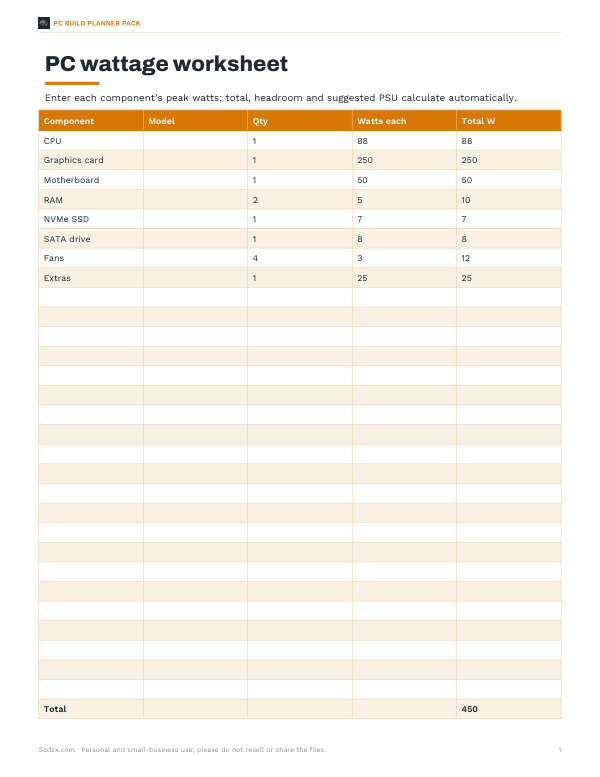
A gaming build with a 65 W mainstream CPU (which can boost to about 88 W), an upper mid-range graphics card rated at 250 W, two RAM sticks, one NVMe and one SATA drive, four fans and moderate extras adds up to about 88 + 250 + 50 + 10 + 7 + 8 + 12 + 25 ≈ 450 W at peak. With 30% headroom plus 50 W for GPU transients, the minimum is about 635 W, so a 650 W PSU is the smallest sensible choice — and a 750 W unit allows a GPU upgrade later. At 88% efficiency the wall draw at that peak is around 510 W.
Connectors to check
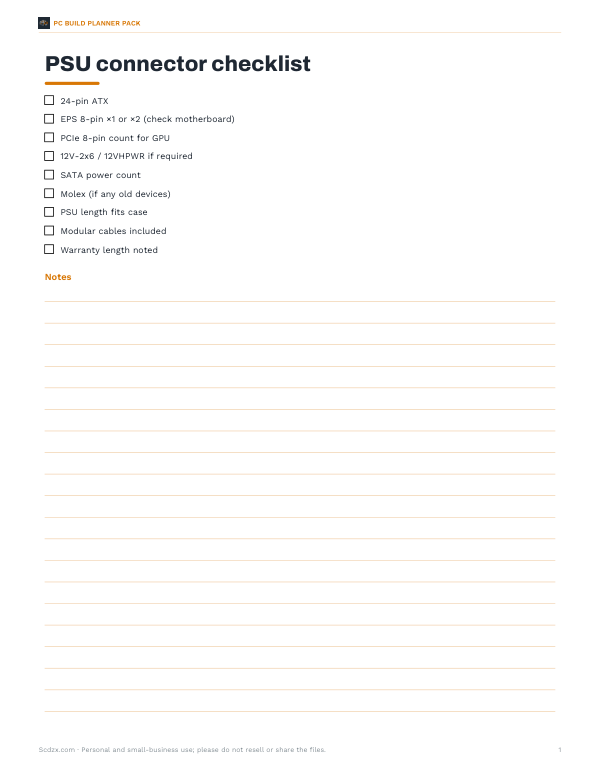
- 24-pin ATX for the motherboard and one or two 8-pin EPS (CPU) connectors — high-end boards often need two.
- PCIe power for the graphics card: 6-pin (75 W), 8-pin (150 W) or the 16-pin 12V-2x6 / 12VHPWR connector on many newer cards.
- SATA power for drives, fans hubs and RGB controllers.
- Use separate PCIe cables rather than daisy-chained pigtails for power-hungry cards, as many GPU makers recommend.
- Seat 16-pin connectors fully and avoid sharp bends near the plug.
ATX 3.x and modular PSUs
Newer ATX 3.0 and 3.1 power supplies are designed to tolerate the short power excursions of modern graphics cards and include a native 12V-2x6 connector. Fully modular PSUs let you attach only the cables you need, which improves airflow and cable management. Also check the PSU’s physical length against your case, and the warranty — good units often carry 7–12 years.
Signs your PSU is too small or failing
- The PC shuts down or restarts under heavy gaming or rendering load.
- Crashes that happen only during GPU-heavy moments, not at idle.
- Coil whine or clicking from the PSU under load.
- Burning smells or discoloured connectors — power off immediately and inspect.
If you see these symptoms, check that all power cables are fully seated before replacing the PSU. A quality unit from a reputable brand with protections (over-current, over-voltage, short-circuit, over-temperature) is worth the cost; the PSU protects every other component in the case.
UPS and circuit sizing
If you use an uninterruptible power supply (UPS), size it by wall draw, not PSU rating, and leave margin — a UPS that is too small may shut down during GPU spikes. A single high-end PC usually sits comfortably on one household circuit, but several powerful PCs plus monitors and space heaters on one circuit can trip a breaker.
Privacy
The calculator runs in your browser; nothing is uploaded.
Frequently asked questions
What size PSU do I need?
Add up your components, add about 30% plus extra for GPU spikes, and round up — many mid-range gaming PCs land at 650–750 W.
Is a bigger PSU bad?
No, apart from cost; a much larger PSU is slightly less efficient at very low loads.
Does an 80 Plus Gold PSU give more power?
No — it wastes less energy as heat; the wattage rating is separate.
What PSU for a 250 W graphics card?
Often 650–750 W, depending on the CPU; check the card maker’s recommendation.
What is 12VHPWR / 12V-2x6?
A 16-pin connector that can carry up to 600 W to newer graphics cards.
Does this include monitors?
No — monitors plug into the wall separately.
Should I buy a PSU with more wattage for future upgrades?
Often worth it — a 750–850 W unit gives room for a bigger GPU later.
How accurate is this estimate?
It is a conservative peak estimate; measured gaming draw is usually lower. Use the GPU maker’s recommendation as a cross-check.